LisaARK Community

Settings

This page explains the installed mods and the most important LisaARK server values in clear language.

Quality of life and new content

Our mods

The list is read from the current Nitrado server configuration. Required mods download automatically when joining.

Mod-ID 941450

Awesome ARK Tools

CurseForge ↗

A collection of practical tools for players and administrators. Depending on the server configuration, it may provide help for travel, management, creatures and everyday tasks. For new players this mainly means fewer unnecessary steps and clearer handling. Not every function has to be enabled on LisaARK.

Mod-ID 929713

TG Stacking Mod 1000-90

CurseForge ↗

Increases many resource stack sizes to as much as 1,000 items and reduces their weight by 90 percent. You can farm for longer, transport more material and keep storage organised. The mod does not create resources; everything still has to be gathered.

Mod-ID 931874

Arkitect Structures Remastered

CurseForge ↗

A comprehensive building mod with additional structures, building pieces and variants. It allows more flexible functional bases and decorative buildings. It supports creative construction but does not override server rules: resources, missions, caves and important spawns must not be blocked.

Mod-ID 940975

Cybers Structures QoL+ (Crossplay)

CurseForge ↗

Adds structures and quality-of-life features that make building, production and resource handling more convenient. Depending on the enabled configuration, workflows may be automated or simplified. New players should test devices carefully and check power, range and inventory rules.

Mod-ID 935528

Visual Storage (Cross Platform)

CurseForge ↗

Provides visible, themed storage containers. Many resources are displayed directly on the container, making it easier to find metal, wood, food and other materials. This greatly improves large bases and shared storage areas.

Mod-ID 953279

Element Bench

CurseForge ↗

Adds a dedicated workbench for Element and related materials. On LisaARK it provides approved Element recipes and conversions in one place. Available recipes and their costs depend on the server balance.

Mod-ID 1521311

TEK Overhaul

CurseForge ↗

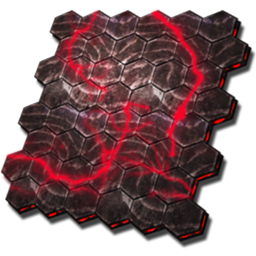
Reworks or expands Tek content. Tek remains tied to progression on LisaARK and is not unlocked automatically at the start. The first planned Tek content begins at level 95, with stronger items and structures following later.

Mod-ID 930494

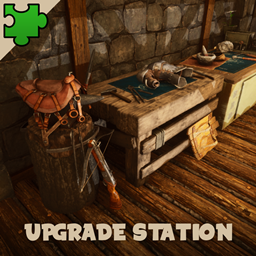
Upgrade Station

CurseForge ↗

The Upgrade Station can improve eligible weapons, tools, armour and saddles. Every quality increase costs resources and can become very expensive at higher levels. Check the required materials before starting an upgrade.

Mod-ID 942024

Dino Depot

CurseForge ↗

A comprehensive solution for storing and managing tamed creatures. Dinos are stored compactly and can be deployed again later. Before storage, check inventory, saddle, mating state and special buffs.

Mod-ID 950914

Awesome Teleporters!

CurseForge ↗

Allows fast travel between player-built teleporters. This saves a great deal of time on large maps. Teleporters must be built, powered and placed correctly and may not interfere with missions, spawns, access routes or other bases.

Mod-ID 1166819

Tek Dinos Everywhere

CurseForge ↗

Allows Tek variants of creatures to appear in more regions and situations. Tek dinos have their familiar mechanical appearance and may provide special resources when defeated. They are still found, fought and tamed through normal gameplay.

Mod-ID 974884

Runic Wyverns

CurseForge ↗

Adds special Runic Wyverns with distinctive glowing effects and their own variants. They expand the range of flying creatures and may differ from normal wyverns in abilities, taming or breeding. Learn about the variant before approaching it.

Mod-ID 1063373

Dragon's Kingdom

CurseForge ↗

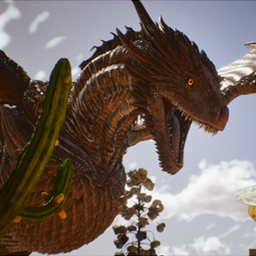
Expands the world with additional dragons and fantasy creatures. These creatures may have unique abilities, taming methods and uses. New players should observe first, prepare carefully and only then attempt taming or combat.

Mod-ID 928501

Solo Farm Mod

CurseForge ↗

Supports players who farm alone by making suitable creatures and workflows easier to use. It reduces organisational effort but does not replace tools, dinos or the gathering work itself.

Mod-ID 928621

Utilities Plus

CurseForge ↗

Provides reusable or more convenient versions of several utility items. Some tools and consumables therefore need to be crafted less often. Available items depend on the active configuration.

Mod-ID 947033

Awesome Spyglass!

CurseForge ↗

An improved spyglass that displays additional information about wild and tamed creatures. This commonly includes level, gender, stats and taming information, making it especially useful for selecting breeding or taming animals.

Mod-ID 935408

Der Dino Finder

CurseForge ↗

Helps locate specific creatures. Depending on the configuration, you can filter by species, gender or level and track matching animals on the map. Range, cooldown and available filters may be limited by the server.

Mod-ID 933975

ArkNav

CurseForge ↗

Improves navigation and orientation with additional map, direction or position information. It makes long journeys and returning to important locations easier but does not protect against dangerous biomes or creatures.

Mod-ID 1019389

Net Pro

CurseForge ↗

Expands net and capture functions for eligible creatures. Nets can temporarily make animals easier to control, helping with taming or defence. Not every creature can be captured, and ammunition or consumables may be required.

Mod-ID 928818

Egg Collector

CurseForge ↗

Automatically collects eligible eggs within a defined area. This helps with larger breeding facilities and prevents eggs from being overlooked. Feeding, mating, hatching and raising still have to be managed.

Mod-ID 1200142

Maeguana Everywhere

CurseForge ↗

Expands Maeguana availability into additional areas, allowing the creature to appear outside its usual locations. Exact spawn locations and frequency depend on the server and mod configuration.

Mod-ID 1006357

Magmasaur: Port and Tweaks [Crossplay]

CurseForge ↗

Brings the Magmasaur to ASA with some QoL improvements

Server values

Multipliers and settings

Only active values that differ from a documented ARK standard are shown. Unknown mod defaults are not guessed.

Configuration sources
  • Game.ini · 27 deviations
  • GameUserSettings.ini · 19 deviations
Setting Value Description
Game.ini · /script/shootergame.shootergamemode
BabyImprintingStatScaleMultiplier Game.ini 2.5 Strength of the bonus from full imprinting.
BabyCuddleIntervalMultiplier Game.ini 0.4 Interval between baby imprint interactions.
BabyCuddleGracePeriodMultiplier Game.ini 10 Grace period for a late imprint interaction.
BabyCuddleLoseImprintQualitySpeedMultiplier Game.ini 0.5 Rate at which missed interactions reduce imprint quality.
EggHatchSpeedMultiplier Game.ini 10 Speed at which fertilised eggs hatch.
BabyMatureSpeedMultiplier Game.ini 10 Speed at which baby creatures mature.
MatingIntervalMultiplier Game.ini 0.5 Interval before creatures can mate again.
BabyImprintAmountMultiplier Game.ini 2 Imprint progress gained per successful interaction.
SupplyCrateLootQualityMultiplier Game.ini 8 Quality multiplier for supply-crate loot.
FishingLootQualityMultiplier Game.ini 8 Quality multiplier for fishing loot.
FuelConsumptionIntervalMultiplier Game.ini 3 Rate at which fuel is consumed.
ResourceNoReplenishRadiusStructures Game.ini 0.5 Distance from structures within which resources do not respawn.
DinoHarvestingDamageMultiplier Game.ini 3 Harvesting effectiveness of tamed-creature attacks.
PerLevelStatsMultiplier_Player[7] Game.ini 30.0 Controls weight for players per allocated level.
PerLevelStatsMultiplier_Player[1] Game.ini 2.0 Controls stamina for players per allocated level.
PerLevelStatsMultiplier_Player[8] Game.ini 2.0 Controls melee damage for players per allocated level.
PerLevelStatsMultiplier_DinoTamed[1] Game.ini 2.5 Controls stamina for tamed creatures per allocated level.
PerLevelStatsMultiplier_DinoTamed[7] Game.ini 2.5 Controls weight for tamed creatures per allocated level.
PerLevelStatsMultiplier_DinoTamed[9] Game.ini 5.0 Controls movement speed for tamed creatures per allocated level.
PerLevelStatsMultiplier_DinoTamed_Add[0] Game.ini 2.0 Controls health for tamed creatures as a base bonus.
PerLevelStatsMultiplier_DinoTamed_Affinity[0] Game.ini 2.0 Controls health for tamed creatures from taming effectiveness.
PerLevelStatsMultiplier_DinoTamed_Add[1] Game.ini 2.0 Controls stamina for tamed creatures as a base bonus.
PerLevelStatsMultiplier_DinoTamed_Affinity[1] Game.ini 2.0 Controls stamina for tamed creatures from taming effectiveness.
PerLevelStatsMultiplier_DinoTamed_Add[7] Game.ini 2.0 Controls weight for tamed creatures as a base bonus.
PerLevelStatsMultiplier_DinoTamed_Affinity[7] Game.ini 3.0 Controls weight for tamed creatures from taming effectiveness.
PerLevelStatsMultiplier_DinoTamed_Affinity[9] Game.ini 2.0 Controls movement speed for tamed creatures from taming effectiveness.
PerLevelStatsMultiplier_DinoTamed_Add[9] Game.ini 2.0 Controls movement speed for tamed creatures as a base bonus.
GameUserSettings.ini · ServerSettings
DifficultyOffset GameUserSettings.ini 1 Base server difficulty and wild creature level setting.
OverrideOfficialDifficulty GameUserSettings.ini 20 Difficulty value that determines the maximum wild level.
TamingSpeedMultiplier GameUserSettings.ini 20 Speed at which creatures are tamed.
HarvestAmountMultiplier GameUserSettings.ini 2 Resource yield from harvesting and mining.
HarvestHealthMultiplier GameUserSettings.ini 2 Durability of resource nodes.
ItemStackSizeMultiplier GameUserSettings.ini 3 Multiplier for the maximum item stack size.
DayCycleSpeedScale GameUserSettings.ini 0.875 Speed of the full day/night cycle.
NightTimeSpeedScale GameUserSettings.ini 2.0 Speed of nighttime.
PlayerDamageMultiplier GameUserSettings.ini 1.2 Multiplier for damage dealt by players.
PlayerCharacterWaterDrainMultiplier GameUserSettings.ini 0.5 Sets the multiplier for “Player Character Water Drain”.
PlayerCharacterFoodDrainMultiplier GameUserSettings.ini 0.5 Sets the multiplier for “Player Character Food Drain”.
PerPlatformMaxStructuresMultiplier GameUserSettings.ini 4 Multiplier for the structure limit on platform saddles.
PlatformSaddleBuildAreaBoundsMultiplier GameUserSettings.ini 3 Multiplier for the build area on platform saddles.
ServerPVE GameUserSettings.ini true Controls whether the server runs in PvE mode.
ResourcesRespawnPeriodMultiplier GameUserSettings.ini 0.5 Time before harvested resources respawn.
ResourceNoReplenishRadiusPlayers GameUserSettings.ini 0.2 Distance from players within which resources do not respawn.
ResourceNoReplenishRadiusStructures GameUserSettings.ini 0.5 Distance from structures within which resources do not respawn.
PvEStructureDecayPeriodMultiplier GameUserSettings.ini 2.0 Time multiplier for PvE structure decay.
PvEDinoDecayPeriodMultiplier GameUserSettings.ini 3.0 Time multiplier for decay of abandoned PvE creatures.

Data last updated:

Values may be adjusted when balancing or technical changes require it. The currently active server configuration always takes priority.